Music scheduling for radio

Program
your
sound.

Rotavox programs the music. Your DJ plays it. Build your clocks and rules once, and Rotavox writes every hour of your week: the right category in every slot, artists kept apart, and each hour timed to end on the hour.

Request beta access

Free during the beta. Paid plans follow, at a flat price per station, with no per-listener fees.

Format clock · 60 minON AIR
ON AIR
Station ID
NEXT · GOLD
Station ID
Gold
Recurrent
Current
Sweeper
The product

Control,
not chance.

Everything you’d expect from a professional music scheduler, built for independent stations. These are its real screens, shown on a demo station.

01

Build the hour

Format clocks
Lay out the hour position by position: categories, IDs and sweepers in the order you want.
Separation rules
Artists, titles and albums kept apart in every log. Tempo and era flow are preferences you weight.
Starter formats
Pick a starter format and have a first log in minutes, then make it your own.
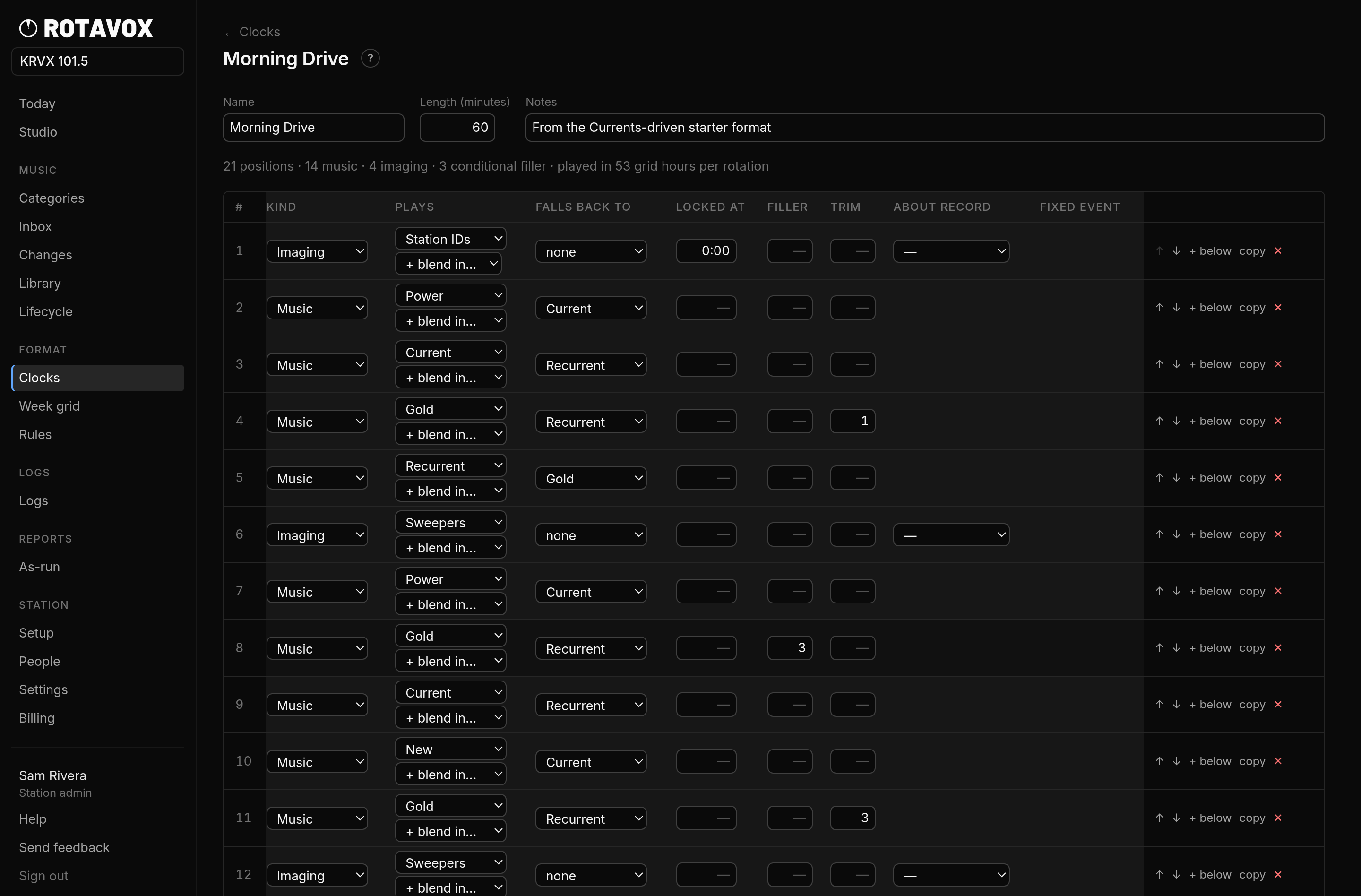
Clocks
The Rotavox clock editor: a format clock for one hour, listing each position in order with its category, beside the clock's separation rules.
02

Shape the week

Dayparting
A week grid sets the clock for every hour, so mornings, middays and overnights can each sound different.
Category rotation
Currents, recurrents and gold each turn over at their own pace.
Song lifecycle
Rest a tired song, bench one, move a rising one up. Rotavox suggests the moves and you decide.
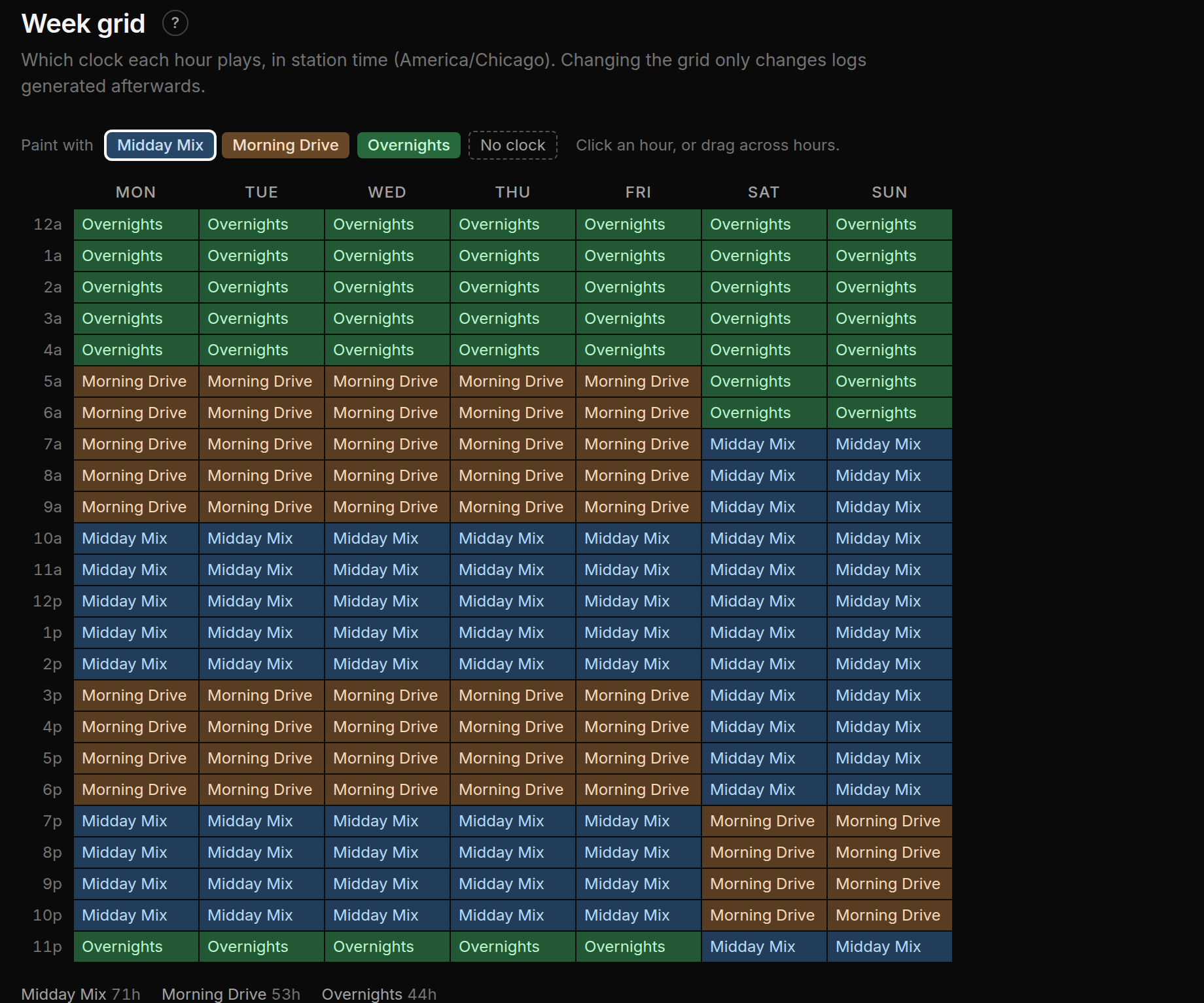
Week grid
The Rotavox week grid: seven days by twenty-four hours, with a clock assigned to every hour of the week.
03

Approve the log

Review before air
Read the whole log before it airs. Replace a song, regenerate an hour, then approve.
History-aware
Every schedule reads what already aired, so rotation stays honest across hours and days.
On the hour
Every hour is planned to end on the hour. With the Runner, it is kept there while it plays.
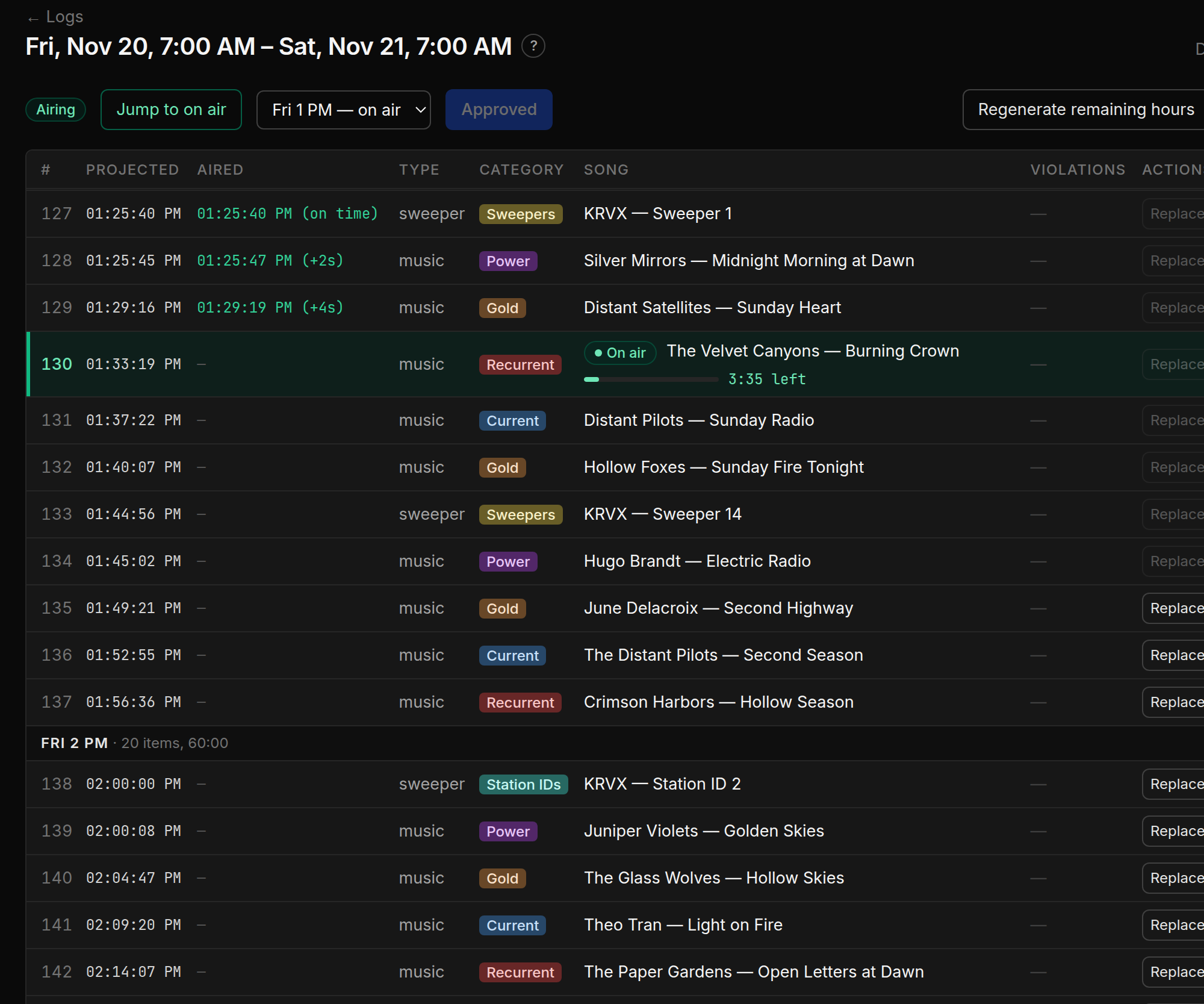
The log · demo station
The Rotavox log for a demo station: an hour of scheduled songs in order, with artist, title and category, ready to review and approve.
The problem

AutoDJ rotates.
It doesn’t schedule.

A rotation picks the next song. A schedule plans the whole hour: what plays, in what order, and when it ends.

Using a playlist or a one-time scheduler? The same applies.

A rotation alone
Song by song
  • —Chooses one song at a time, with no view of the hour
  • —Hours run long or short, so the top of the hour drifts
  • —You find out what played after it airs
  • —Every hour is built the same way
Rotavox
The whole hour
  • →Plans every hour before it airs
  • →Times each hour to end on the hour
  • →Shows you the log to change and approve first
  • →A different clock for any hour of the week
How it works

From clock
to on air.

You set the format. Rotavox writes the log from your library. Your playout puts it on air.

01
Program

Build your clocks

Lay out each hour position by position, then set the rules that keep artists and titles apart.

shapethe hour
02
Schedule

Rotavox writes the log

Rotavox writes every hour of the day or week, following your clocks and rules and what has already aired. Read it, swap a song, approve it.

writethe log
03
Air

Your DJ plays it

Pick the way that fits your station.

on airyour station
For RadioDJ

Rotavox + Runner

The Rotavox Runner is a small Windows app on your broadcast PC. It plays your approved log in RadioDJ and keeps each hour on time. RadioDJ still does the playing, and its play history stays complete.

For any other playout

Rotavox

Download each log as a CSV or M3U file and load it into the system you already use.

Coming

Rotavox Cloud DJ

Rotavox holds your audio and plays your logs to your stream. No broadcast PC.

Plays live in RadioDJ 2 and 3Exports to any playout system · Rotavox Cloud DJ is coming
Safe on air

What happens if
something breaks.

Rotavox plans the music and your playout system still plays it, so here’s what happens on air when the internet, Rotavox or the Runner stops.

Internet down? Still playing.

The Runner keeps every approved log starting in the next 26 hours on the broadcast PC and keeps RadioDJ playing them; export stations already hold theirs.

AutoDJ as the backstop.

If the Runner stops or runs out of approved logs, RadioDJ’s AutoDJ takes over, normally within about 30 seconds, playing the rotation you chose.

RadioDJ still plays it.

RadioDJ plays your audio from your own PC and keeps its own history and play counts, and a DJ can stop the player to go live.

Approved logs keep airing.

If a trial or subscription ends, logs you’ve already approved keep airing; only making and approving new ones stops.

Running RadioDJ? See what the Runner does on your PC, and the questions stations ask.

On air

Running a real station,
every day.

The BOLT, a new-rock station, has run on Rotavox around the clock since October. Every song it plays was scheduled here.

Listen to The BOLT
Beta · now open

Get on air
with Rotavox.

The beta is open to independent stations. Tell us about yours and we’ll set it up and send your invite, usually within a week or two. It’s free during the beta. Paid plans follow, at a flat price per station, with no per-listener fees.

Request access